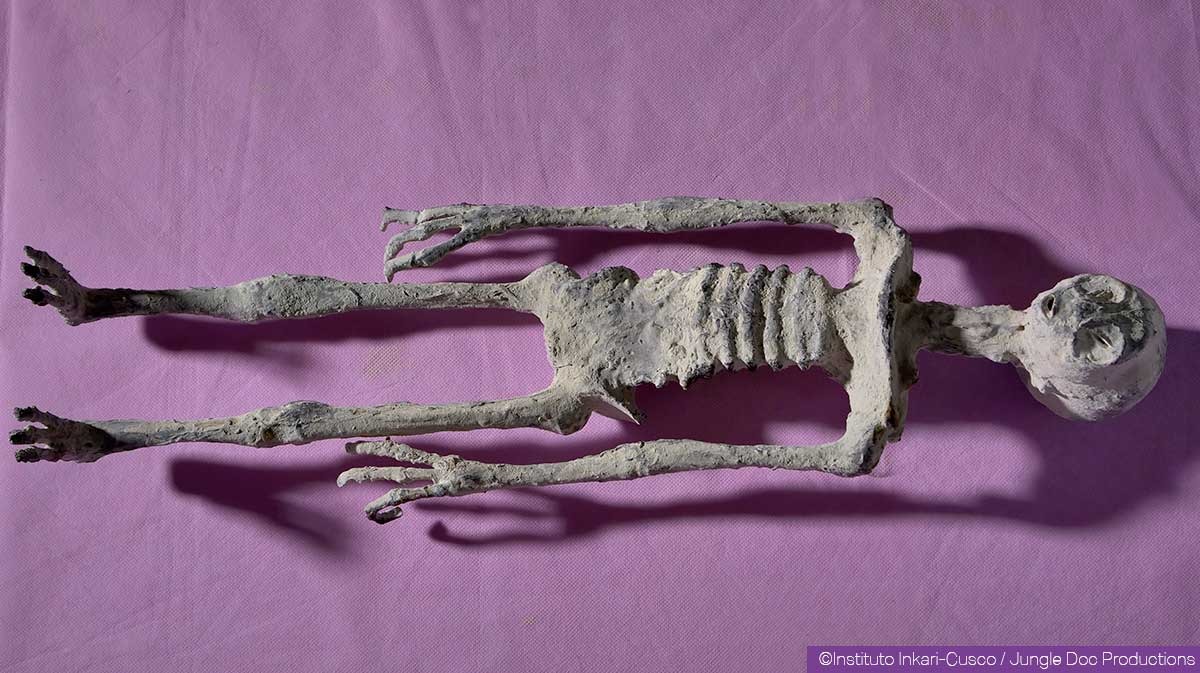
Alberto
Ser tridáctilo
Primera posible evidencia de un espécimen masculino en crecimiento de 60,5 cm.
Información General
| Tamaño: | 60,50 cm |
| Especie: | Reptil Humanoide |
| Género: | Masculino |
| Manos y Pies: | Manos con 3 dedos, incluyendo 4 falanges y una uña larga; pies con 3 dedos, incluyendo 3 falanges |
| Costillas: | 6 pares de costillas, más 2 pares flotantes |
| Implantes Metálicos: | Presencia de un implante metálico insertado en la cadera derecha |
Análisis del Dr. Roger Zúñiga de la Universidad de Ica sobre la hipótesis del cráneo de llama en especímenes de 60 cm, como Alberto
Este video documenta la investigación de la Universidad de Ica sobre especímenes de 60 cm, como Alberto.
- Se enfrentaron a la hipótesis de que eran muñecos modernos o artificiales hechos con cráneos de llama.
- La facultad recopiló recursos y realizó análisis detallados.
- Se obtuvieron muestras del cráneo y otra región corporal de Alberto.
- Las pruebas científicas confirmaron que ambas muestras provienen del mismo espécimen.
- Se descartó que el cráneo esté hecho de material de llama u otra sustancia externa.
- Esto valida la integridad biológica de Alberto como un organismo único, no una construcción artificial.
Video de Alberto
Video cortesía de Todd Levesque (Colaborador independiente)
Galería de Medios
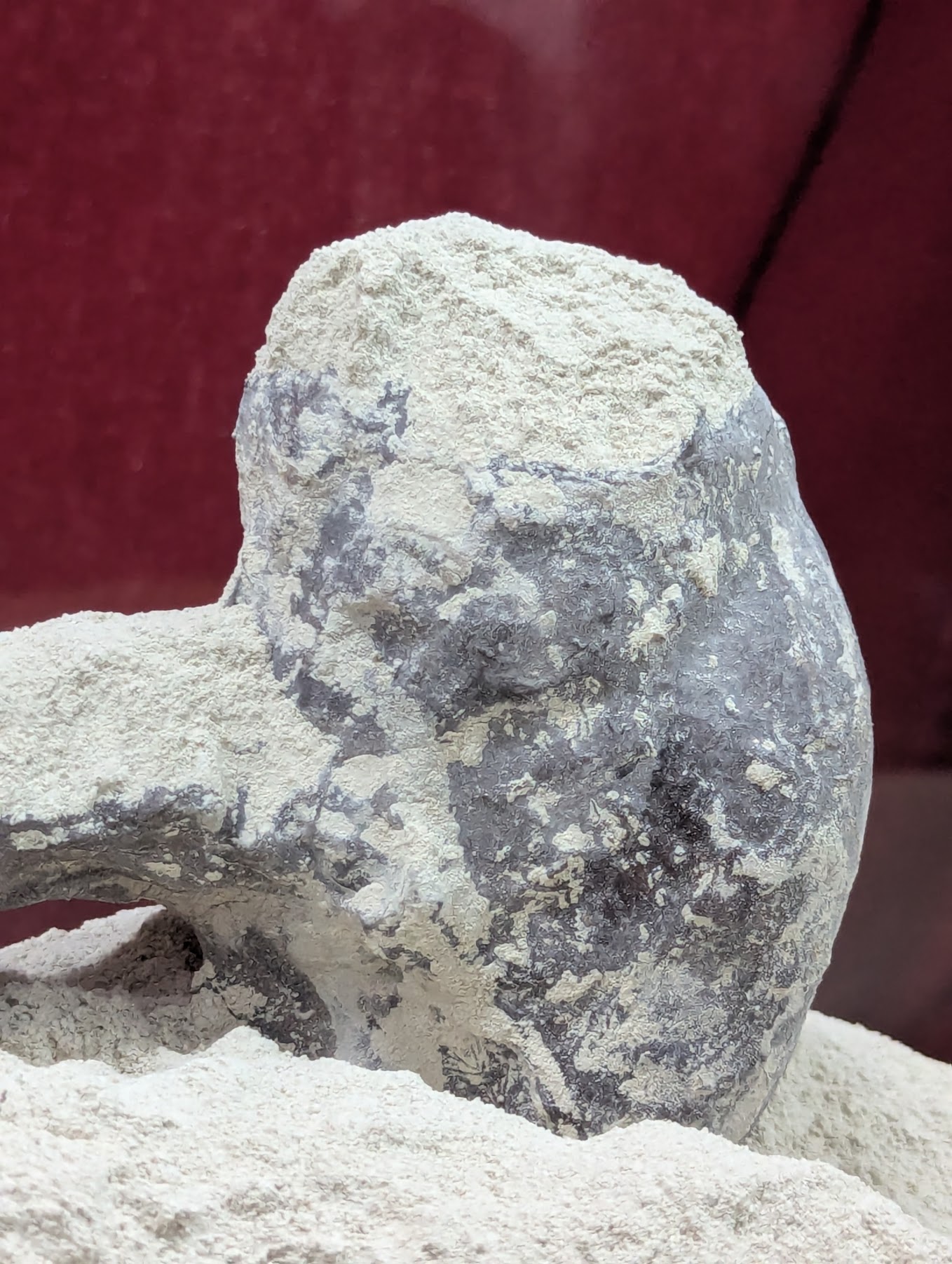
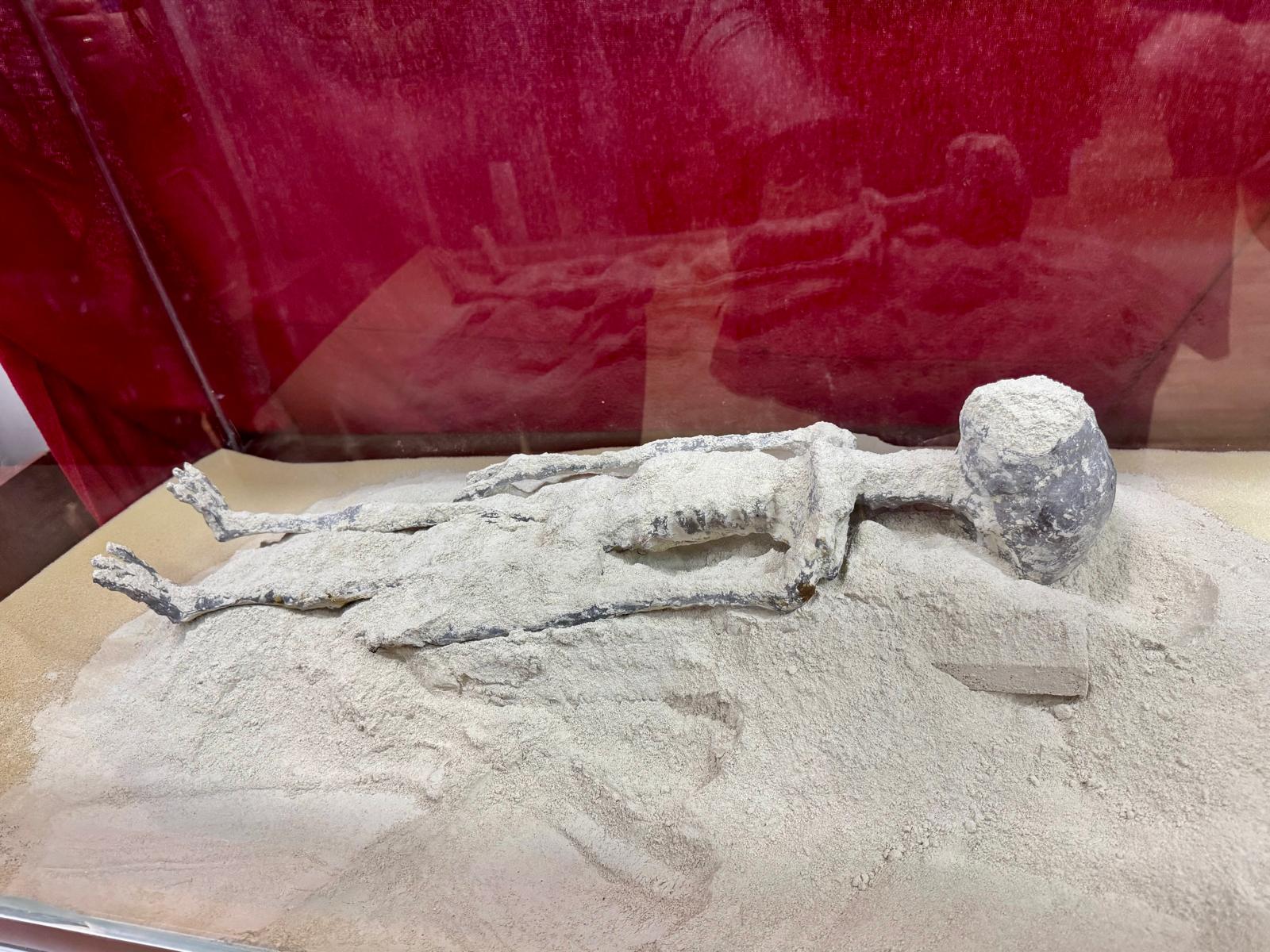
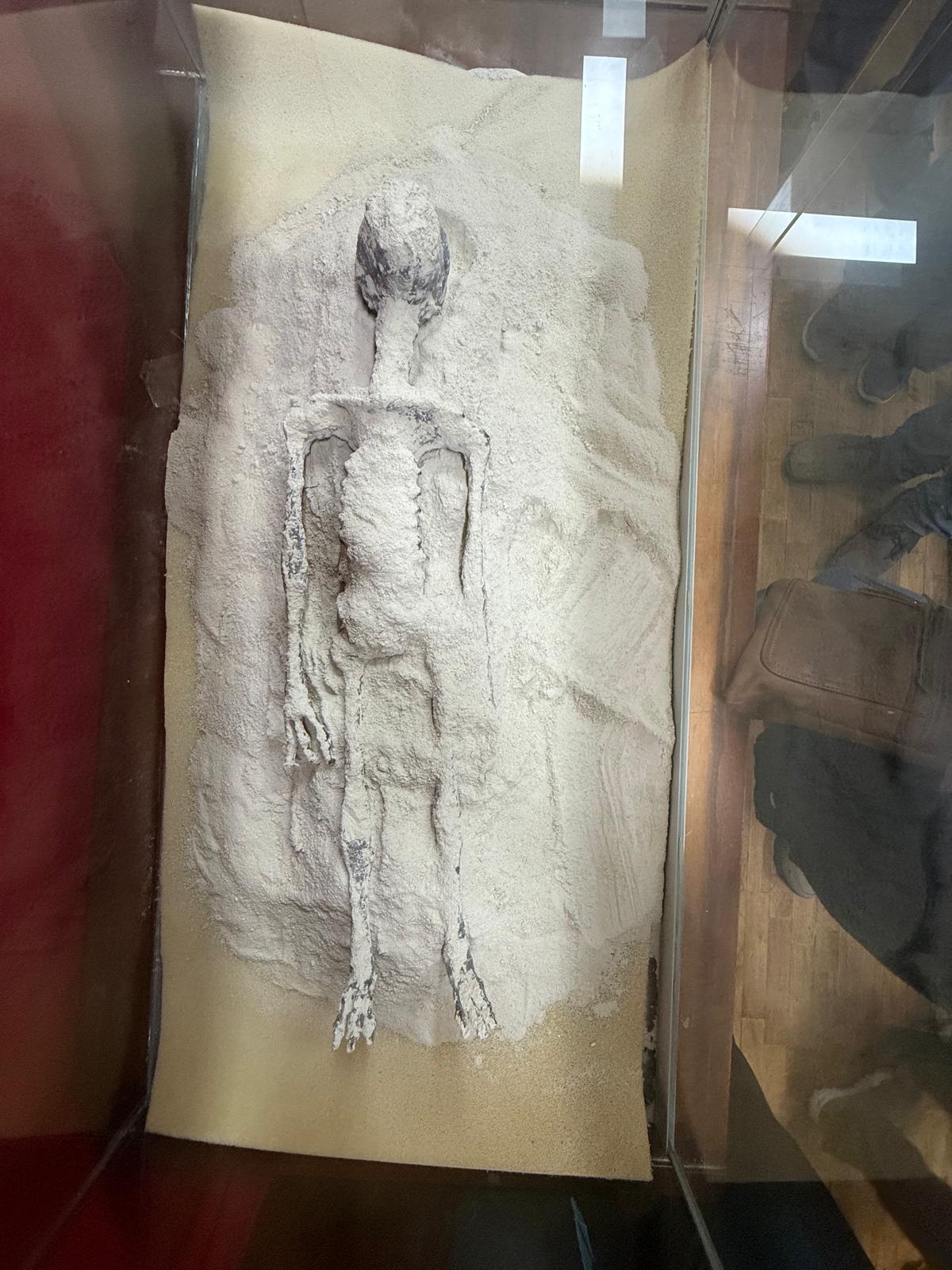
Fotos cortesía de Todd Levesque (Colaborador independiente)
Archivos DICOM Disponibles
Tras la investigación de 2024 del Ministerio de Cultura sobre María y Wawita, nuestro equipo logró que se aprobara una moción de transparencia en los tribunales. Aquí están los archivos médicos originales de ese estudio, junto con los de Montserrat, Luisa, Alberto, Antonio, Joy, Suyay, Cráneos Sueltos, y Victoria. Los ofrecemos tal como los recibimos.
Verificación de Integridad de Archivos
Compara el hash SHA-256 proporcionado con el de tu archivo descargado para confirmar que es auténtico. Los archivos de María y Wawita (excepto los marcados como UNICA) están disponibles para todos. Los archivos de María DICOM UNICA, Wawita DICOM UNICA, Montserrat, Luisa, Alberto, Paloma, Antonio, Joy, Suyay, Cráneos Sueltos, y Victoria requieren una cuenta de investigador aprobada y aceptar las condiciones de citación (o tener anonimato aprobado).
- Montserrat Parte 1:99793871D54A41973ECE03AD4EA50A359EA7278B6A6C48CC9AA4C22BD9DF7371
Instrucciones por sistema operativo:
- Windows: Usa PowerShell:
Get-FileHash "Montserrat_part1.zip" -Algorithm SHA256 - macOS: Usa la terminal:
shasum -a 256 Montserrat_part1.zip - Linux: Usa la terminal:
sha256sum Montserrat_part1.zip
cd "ruta\al\directorio"(Windows) ocd /ruta/al/directorio(macOS/Linux) antes de ejecutar el comando. - Windows: Usa PowerShell:
- Montserrat Parte 2:14CCE0B6E015709A225AEC1BE84568A7EF983E10E0FA950D267704599C332653
Instrucciones por sistema operativo:
- Windows: Usa PowerShell:
Get-FileHash "Montserrat_part2.zip" -Algorithm SHA256 - macOS: Usa la terminal:
shasum -a 256 Montserrat_part2.zip - Linux: Usa la terminal:
sha256sum Montserrat_part2.zip
cd "ruta\al\directorio"(Windows) ocd /ruta/al/directorio(macOS/Linux) antes de ejecutar el comando. - Windows: Usa PowerShell:
- Luisa DICOM:B47C9ACCC5ED012CC91455E2344ED4EE50AA42EC2F9EB37A582FE9E6B6F70E3B
Instrucciones por sistema operativo:
- Windows: Usa PowerShell:
Get-FileHash "Luisa_DICOM.zip" -Algorithm SHA256 - macOS: Usa la terminal:
shasum -a 256 Luisa_DICOM.zip - Linux: Usa la terminal:
sha256sum Luisa_DICOM.zip
cd "ruta\al\directorio"(Windows) ocd /ruta/al/directorio(macOS/Linux) antes de ejecutar el comando. - Windows: Usa PowerShell:
- Alberto DICOM:FEBB2A71F362A9E9EF72ECD9C72194AFF4FE6CF1376613E358CB43B4C0FEAB71
Instrucciones por sistema operativo:
- Windows: Usa PowerShell:
Get-FileHash "Alberto_DICOM.zip" -Algorithm SHA256 - macOS: Usa la terminal:
shasum -a 256 Alberto_DICOM.zip - Linux: Usa la terminal:
sha256sum Alberto_DICOM.zip
cd "ruta\al\directorio"(Windows) ocd /ruta/al/directorio(macOS/Linux) antes de ejecutar el comando. - Windows: Usa PowerShell:
- María - Tomografía:9A3F5953B5A5DF38B61B97E40F36A8F0F2CA8CADE72CC12ED210A31F2EDA9441
Instrucciones por sistema operativo:
- Windows: Usa PowerShell:
Get-FileHash "maria_momia_tomografia.zip" -Algorithm SHA256 - macOS: Usa la terminal:
shasum -a 256 maria_momia_tomografia.zip - Linux: Usa la terminal:
sha256sum maria_momia_tomografia.zip
cd "ruta\al\directorio"(Windows) ocd /ruta/al/directorio(macOS/Linux) antes de ejecutar el comando. - Windows: Usa PowerShell:
- María DICOM UNICA:14EC7F08A33CCE394996A28645F4AB78ABA265B88D1582809DCA98E83208729F
Instrucciones por sistema operativo:
- Windows: Usa PowerShell:
Get-FileHash "Maria_DICOM_UNICA.zip" -Algorithm SHA256 - macOS: Usa la terminal:
shasum -a 256 Maria_DICOM_UNICA.zip - Linux: Usa la terminal:
sha256sum Maria_DICOM_UNICA.zip
cd "ruta\al\directorio"(Windows) ocd /ruta/al/directorio(macOS/Linux) antes de ejecutar el comando. - Windows: Usa PowerShell:
- Wawita - Tomografía Abdominal:80C9F75F1377FC21740307CDDB1B4F4734104E37C11DB8E97ADF6C6DFAF1C0DD
Instrucciones por sistema operativo:
- Windows: Usa PowerShell:
Get-FileHash "momia_wawito_tomografia_abd_sc.zip" -Algorithm SHA256 - macOS: Usa la terminal:
shasum -a 256 momia_wawito_tomografia_abd_sc.zip - Linux: Usa la terminal:
sha256sum momia_wawito_tomografia_abd_sc.zip
cd "ruta\al\directorio"(Windows) ocd /ruta/al/directorio(macOS/Linux) antes de ejecutar el comando. - Windows: Usa PowerShell:
- Wawita - Pelvimetría:2C8C657A6631056285676A975D31DFDF4F1EFBC6E526A58D3AA5DB1E6D194CAE
Instrucciones por sistema operativo:
- Windows: Usa PowerShell:
Get-FileHash "pelvimetria_wawito.zip" -Algorithm SHA256 - macOS: Usa la terminal:
shasum -a 256 pelvimetria_wawito.zip - Linux: Usa la terminal:
sha256sum pelvimetria_wawito.zip
cd "ruta\al\directorio"(Windows) ocd /ruta/al/directorio(macOS/Linux) antes de ejecutar el comando. - Windows: Usa PowerShell:
- Wawita - Momia:AF5737E3E7B3F5921C424C0C06EFB3E4FB13F3304C2AAF5166ACBB830C4F5210
Instrucciones por sistema operativo:
- Windows: Usa PowerShell:
Get-FileHash "wawito_momia.zip" -Algorithm SHA256 - macOS: Usa la terminal:
shasum -a 256 wawito_momia.zip - Linux: Usa la terminal:
sha256sum wawito_momia.zip
cd "ruta\al\directorio"(Windows) ocd /ruta/al/directorio(macOS/Linux) antes de ejecutar el comando. - Windows: Usa PowerShell:
- Wawita DICOM UNICA:70CCA09D10809A52266B54DF19EE86781536F4D286560D89720A150AEF721DEA
Instrucciones por sistema operativo:
- Windows: Usa PowerShell:
Get-FileHash "Wawita_DICOM_UNICA.zip" -Algorithm SHA256 - macOS: Usa la terminal:
shasum -a 256 Wawita_DICOM_UNICA.zip - Linux: Usa la terminal:
sha256sum Wawita_DICOM_UNICA.zip
cd "ruta\al\directorio"(Windows) ocd /ruta/al/directorio(macOS/Linux) antes de ejecutar el comando. - Windows: Usa PowerShell:
- Sebastián DICOM:B84F77A755952EF4BECBD18BCDEA57872803BDF39664EE8C4ADA51129E6C1CDE
Instrucciones por sistema operativo:
- Windows: Usa PowerShell:
Get-FileHash "DICOM HD - SEBASTIAN.zip" -Algorithm SHA256 - macOS: Usa la terminal:
shasum -a 256 DICOM HD - SEBASTIAN.zip - Linux: Usa la terminal:
sha256sum DICOM HD - SEBASTIAN.zip
cd "ruta\al\directorio"(Windows) ocd /ruta/al/directorio(macOS/Linux) antes de ejecutar el comando. - Windows: Usa PowerShell:
- Santiago DICOM:FB8A806B20B0D7C0EB672B988C91E1A01D6D45B63299581E1C578EA8ED6B1D16
Instrucciones por sistema operativo:
- Windows: Usa PowerShell:
Get-FileHash "DICOM SANTIAGO.zip" -Algorithm SHA256 - macOS: Usa la terminal:
shasum -a 256 DICOM SANTIAGO.zip - Linux: Usa la terminal:
sha256sum DICOM SANTIAGO.zip
cd "ruta\al\directorio"(Windows) ocd /ruta/al/directorio(macOS/Linux) antes de ejecutar el comando. - Windows: Usa PowerShell:
- Victoria DICOM:27F826ACF207AC72834F446EE8DFBF21CD241A9BB997F2D628B3F5CB90E3B090
Instrucciones por sistema operativo:
- Windows: Usa PowerShell:
Get-FileHash "DICOM - VICTORIA.zip" -Algorithm SHA256 - macOS: Usa la terminal:
shasum -a 256 DICOM - VICTORIA.zip - Linux: Usa la terminal:
sha256sum DICOM - VICTORIA.zip
cd "ruta\al\directorio"(Windows) ocd /ruta/al/directorio(macOS/Linux) antes de ejecutar el comando. - Windows: Usa PowerShell:
- DICOM de Joy y Cráneos Sueltos:38227906262BA65F79698D7337E011774CC9C687F4A8F4A661D08F8C84F8517B
Instrucciones por sistema operativo:
- Windows: Usa PowerShell:
Get-FileHash "DICOM SER ALADO 2 - JOY 2024 and Loose Skull.zip" -Algorithm SHA256 - macOS: Usa la terminal:
shasum -a 256 DICOM SER ALADO 2 - JOY 2024 and Loose Skull.zip - Linux: Usa la terminal:
sha256sum DICOM SER ALADO 2 - JOY 2024 and Loose Skull.zip
cd "ruta\al\directorio"(Windows) ocd /ruta/al/directorio(macOS/Linux) antes de ejecutar el comando. - Windows: Usa PowerShell:
- DICOM de Suyay:54FCBD54C505478B200A93F8274B9D0B91C90231C166053001E0758F19C16620
Instrucciones por sistema operativo:
- Windows: Usa PowerShell:
Get-FileHash "wetransfer_dicom-suyay_2026-09-07_2005.zip" -Algorithm SHA256 - macOS: Usa la terminal:
shasum -a 256 wetransfer_dicom-suyay_2026-09-07_2005.zip - Linux: Usa la terminal:
sha256sum wetransfer_dicom-suyay_2026-09-07_2005.zip
cd "ruta\al\directorio"(Windows) ocd /ruta/al/directorio(macOS/Linux) antes de ejecutar el comando. - Windows: Usa PowerShell:
- DICOM de Antonio (2024):4AF49C95FF87717383CE79E1E7530081B67C8072825FE699255329A3C3AE093C
Instrucciones por sistema operativo:
- Windows: Usa PowerShell:
Get-FileHash "wetransfer_dicom-antonio-momia-dos-2024_2026-10-01_1839.zip" -Algorithm SHA256 - macOS: Usa la terminal:
shasum -a 256 wetransfer_dicom-antonio-momia-dos-2024_2026-10-01_1839.zip - Linux: Usa la terminal:
sha256sum wetransfer_dicom-antonio-momia-dos-2024_2026-10-01_1839.zip
cd "ruta\al\directorio"(Windows) ocd /ruta/al/directorio(macOS/Linux) antes de ejecutar el comando. - Windows: Usa PowerShell:

Nota: Los archivos DICOM de María (UNICA), Wawita (UNICA), Montserrat, Luisa, Alberto, Antonio, Joy, Suyay, Cráneos Sueltos, y Victoria solo están disponibles para cuentas de investigadores aprobadas tras enviar una solicitud y aceptar las condiciones de citación (o tener anonimato aprobado).